Helmarr Supported Services: What Each Integration Does
Helmarr is a native iOS, iPadOS, and macOS client for self-hosted media stacks. This guide explains what each Helmarr supported service does, so you know which integration handles library automation, indexer management, downloads, media requests, playback analytics, media processing, or server administration.
Helmarr has a 4.8 rating with more than 500 ratings because it is not just a list of isolated service screens. The useful part is bringing the daily checks together: what is being requested, searched, downloaded, processed, streamed, and warned about.
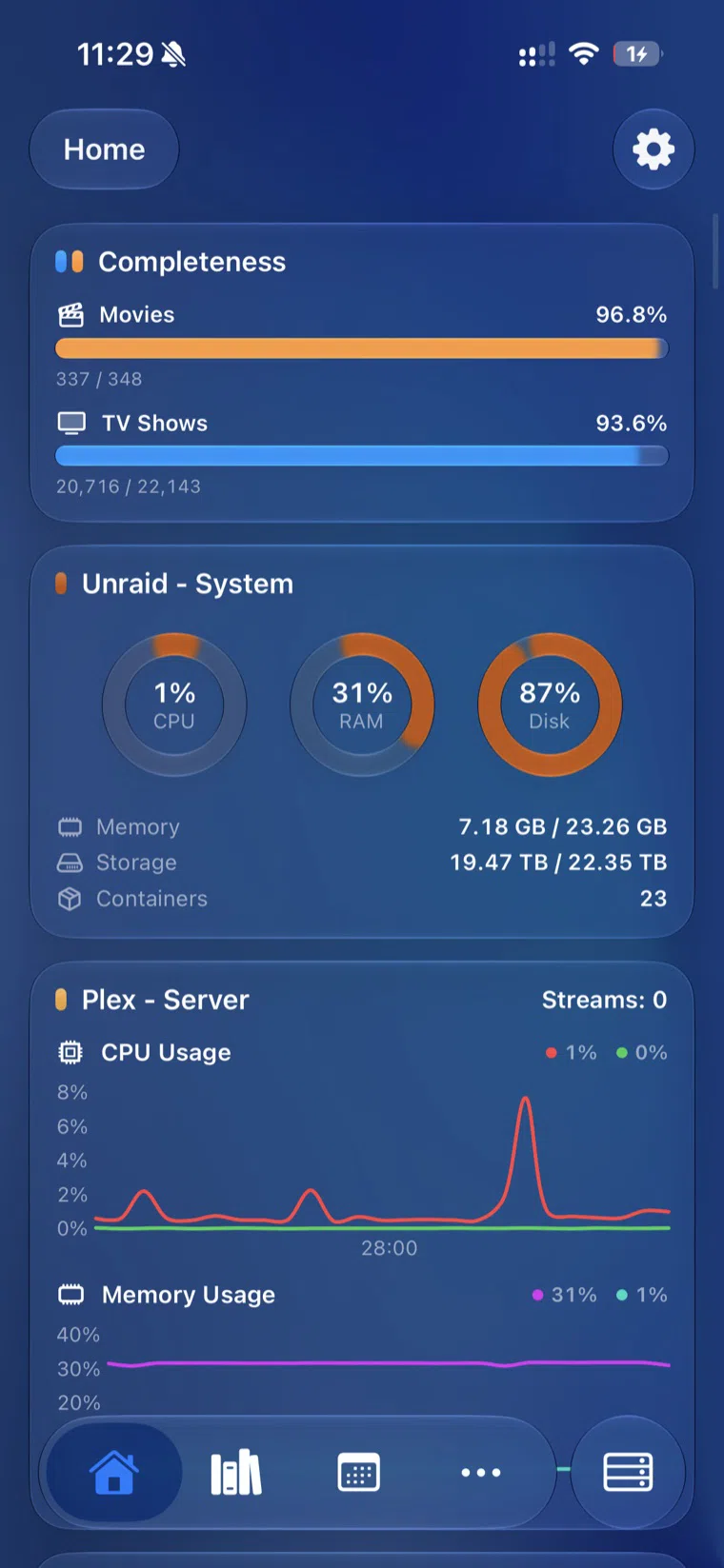
The Helmarr home dashboard brings library completeness, server health, and playback monitoring into one native view.
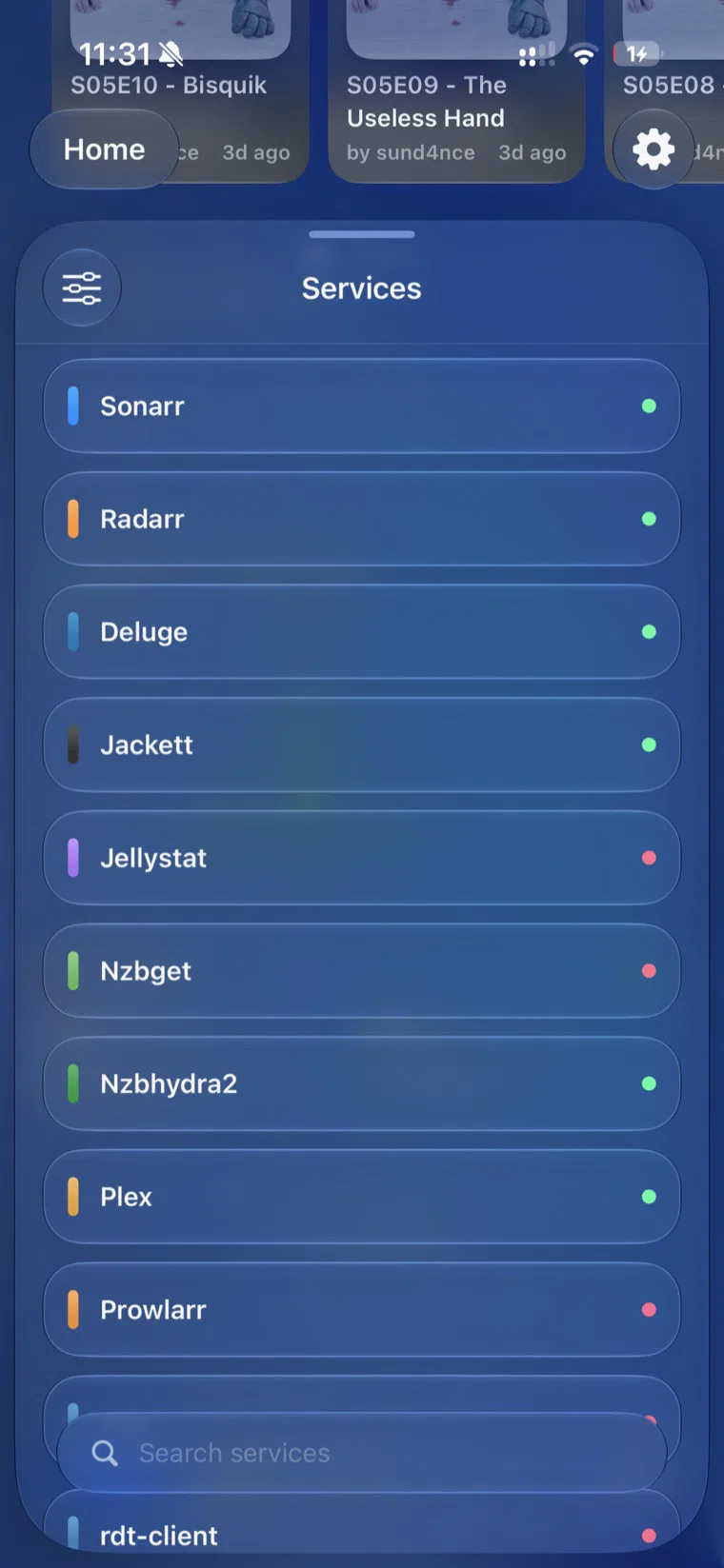
The services list shows the practical breadth: media managers, download clients, indexers, playback tools, and more in one app.
How the stack fits together
A typical self-hosted media stack has separate jobs:
- Library automation: Sonarr, Radarr, Lidarr, and Bazarr decide what should be in the library and keep metadata or subtitles organized.
- Indexer management: Prowlarr, NZBHydra2, and Jackett connect automation tools to search sources.
- Downloads: qBittorrent, Transmission, Deluge, SABnzbd, and NZBGet transfer files.
- Requests and onboarding: Seerr, Overseerr, Jellyseerr, and Wizarr handle user requests or invites.
- Playback and analytics: Plex, Emby, Tautulli, Jellystat, and Tracearr show what is being watched and where.
- Processing and health checks: Tdarr standardizes files, runs transcode or remux workflows, and checks media health.
- Server operations: Unraid, SSH, and SFTP expose host state and direct admin access.
Sonarr
Sonarr handles TV episode automation. It tracks series and seasons, applies quality profiles, searches Usenet or torrent indexers, sends matching releases to a download client, then imports and organizes completed files into a TV library.
Radarr
Radarr handles movie automation. It tracks wanted films, monitors availability, applies quality and custom format rules, sends matching releases to download clients, and keeps movie files named and organized for media servers like Plex, Jellyfin, or Emby.
Lidarr
Lidarr handles music library automation. It tracks artists and albums, uses MusicBrainz-style metadata concepts, searches configured sources, sends downloads to a client, and organizes audio files into a structured music collection.
Bazarr
Bazarr handles subtitle automation. It connects to Sonarr and Radarr, detects missing subtitle files, searches configured subtitle providers, downloads matching subtitles, and keeps subtitle files aligned with the media files your server is already using.
Prowlarr
Prowlarr handles indexer management. It centralizes torrent tracker and Usenet indexer configuration, then syncs those indexers into apps like Sonarr, Radarr, and Lidarr so every media manager does not need separate setup.
NZBHydra2
NZBHydra2 handles Usenet meta search. It aggregates multiple Newznab indexers and Torznab trackers behind one search interface, tracks indexer response and usage, and can give automation tools one consolidated endpoint.
Jackett
Jackett handles torrent tracker translation. It acts as an API proxy that turns app requests from Sonarr, Radarr, Lidarr, qBittorrent, and similar tools into tracker-specific queries, then returns results in automation-friendly formats.
qBittorrent
qBittorrent handles torrent transfer control. It manages magnet links, torrent files, peers, trackers, priorities, categories, tags, speed limits, and seeding behavior.
Transmission
Transmission handles lightweight BitTorrent downloading. It runs well on servers, NAS devices, and containers, and gives the stack a simple torrent client for adding, pausing, removing, and monitoring transfers.
Deluge
Deluge handles plugin-friendly BitTorrent downloading. It separates the daemon from the interface, supports remote control, and is often used when users want a configurable torrent client with a server process that runs independently from the UI.
SABnzbd
SABnzbd handles Usenet downloading. It consumes NZB files, connects to Usenet servers, downloads binary articles, repairs and extracts completed jobs, and provides a queue that Sonarr, Radarr, Lidarr, or manual workflows can manage.
NZBGet
NZBGet handles efficient Usenet downloading. It retrieves articles from Usenet using NZB files, runs well on low-power servers, and focuses on fast queue processing, post-processing, and automation through its web interface and API.
Overseerr
Overseerr handles Plex-focused media requests. Users browse movies and shows, submit requests, and approved items get handed to Radarr or Sonarr so the automation stack can fetch the content.
Jellyseerr
Jellyseerr handles request management for Jellyfin and Emby users who want an Overseerr-style workflow. It lets users discover media, submit requests, and route approved movies or shows into Radarr and Sonarr.
Seerr
Seerr is the unified request-management path for Plex, Jellyfin, and Emby. It combines media discovery, user login integration, request approval, and Sonarr or Radarr handoff into one request layer for mixed media-server environments.
Tautulli
Tautulli handles Plex monitoring and analytics. It tracks current Plex activity, stream history, users, devices, libraries, bandwidth, and notifications so administrators can understand how their Plex server is being used.
Jellystat
Jellystat handles Jellyfin statistics. It records playback activity, user history, library usage, and server analytics for Jellyfin installations that need a dedicated reporting layer similar to Tautulli for Plex.
Tracearr
Tracearr handles playback monitoring and account-sharing detection across Plex, Jellyfin, and Emby. It analyzes stream access, user trust, violations, and historical playback patterns so administrators can spot unusual sharing behavior.
Tdarr
Tdarr handles media processing and health checks. It can scan libraries, run conditional transcode or remux flows, standardize codecs and containers, remove unwanted streams, and distribute work across CPU or GPU nodes.
Helmarr fully supports Tdarr monitoring, so you can keep an eye on that processing layer from your iPhone, iPad, or Mac alongside Sonarr, Radarr, download clients, and server status. That matters because Tdarr jobs can be long-running and hardware-heavy; they belong in the same operational view as the rest of the stack.
For a deeper explanation, read What Is Tdarr? Media Transcoding, Health Checks, and Helmarr Monitoring.
Plex
Plex handles media serving and playback. Plex Media Server indexes local media libraries, adds metadata, tracks active streams, and serves movies, TV, music, and photos to client apps. Helmarr’s Plex integration focuses on now-playing visibility and stream details.
Emby
Emby handles media serving and playback with a self-hosted server and client ecosystem. Helmarr connects to Emby for monitoring and stream visibility in stacks that use Emby instead of, or alongside, Plex and Jellyfin.
Wizarr
Wizarr handles user onboarding. It creates invitation links for Plex, Jellyfin, Emby, and related services, then guides new users through account access, app installation, and request-system setup without requiring a manual admin walkthrough.
Unraid
Unraid handles host and storage management. It is a NAS operating system, application server, and virtual machine host. In a media stack, it often runs Docker containers, manages disks and shares, and exposes server health data that Helmarr can monitor.
SSH and SFTP
SSH and SFTP handle direct server access. SSH provides command execution and host-level administration, while SFTP provides file browsing and editing over the same secure transport family. In Helmarr, this is infrastructure control, not media automation.
The practical split
If you are planning a Helmarr setup from scratch, think in layers:
- Use Sonarr, Radarr, and Lidarr for library decisions.
- Use Prowlarr, NZBHydra2, or Jackett for search and indexer access.
- Use qBittorrent, Transmission, Deluge, SABnzbd, or NZBGet for transfers.
- Use Seerr, Overseerr, Jellyseerr, or Wizarr for user-facing requests and invites.
- Use Tdarr for media processing, standardization, and health checks.
- Use Plex, Emby, Tautulli, Jellystat, Tracearr, Unraid, SSH, and SFTP for playback visibility, analytics, and server control.
The point is not to run everything. It is to make the pieces you already run visible in one native Apple app.