What Is Tdarr? Media Transcoding, Health Checks, and Helmarr Monitoring
Tdarr is the part of a media stack that deals with the files after they exist. Sonarr and Radarr decide what to grab. qBittorrent, SABnzbd, Transmission, Deluge, or NZBGet download it. Plex, Jellyfin, or Emby serve it. Tdarr sits in between and asks: is this file in the format you actually want?
That can mean transcoding video, remuxing containers, removing unwanted audio or subtitle streams, running health checks, or standardizing a library so more files direct play cleanly later.
Helmarr fully supports Tdarr monitoring, so you can keep an eye on that processing layer from iPhone, iPad, or Mac alongside the rest of your self-hosted media stack.
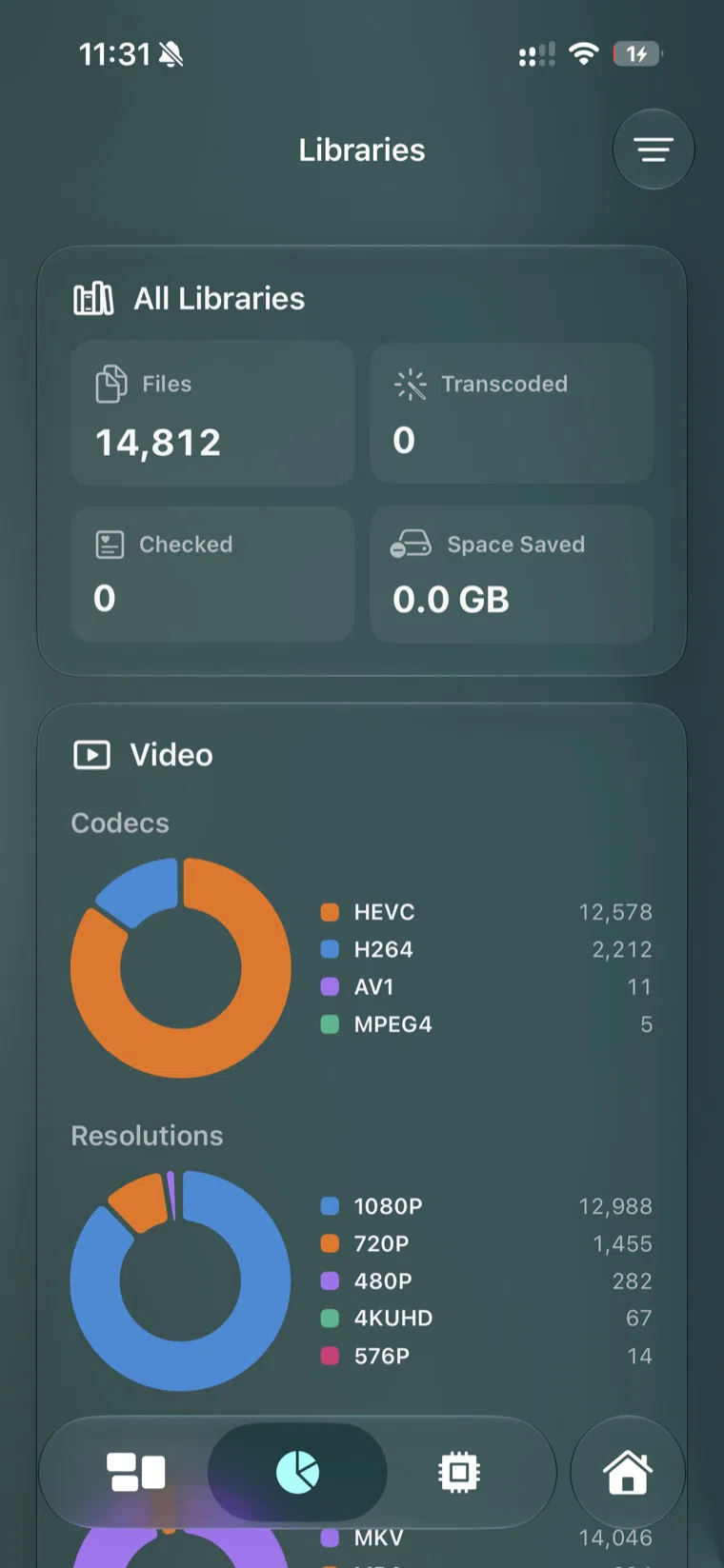
Helmarr shows Tdarr library statistics such as file counts, codec distribution, resolutions, checked files, and space saved.
What Tdarr does
Tdarr is a self-hosted media processing system built around a server and one or more nodes.
flowchart LR
  A["Media library"] --> B["Tdarr Server"]
  B --> C{"Flow / plugin rules"}
  C --> D["CPU worker"]
  C --> E["GPU worker"]
  D --> F["Processed file"]
  E --> F
  B --> G["Health checks and library stats"]
  H["Helmarr"] -->|"monitoring"| B
The server coordinates libraries, rules, queues, stats, and node activity. Nodes do the work. A node can run on the same machine as the server or on another device with spare CPU or GPU capacity.
Common Tdarr jobs include:
- Transcoding H.264 files to H.265/HEVC to save space.
- Remuxing files into a preferred container such as MKV or MP4.
- Removing unwanted audio, subtitle, commentary, or metadata streams.
- Adding or standardizing audio tracks.
- Running health checks to catch broken media files.
- Distributing work across multiple machines or GPUs.
How Tdarr helps a media stack
Tdarr is useful when your library has grown past “a few files on a disk” and starts behaving like infrastructure.
It can reduce storage pressure
A common Tdarr use case is converting large H.264 files to H.265/HEVC. Savings vary by source, settings, and quality tolerance, but the point is simple: a large library can waste a lot of disk space when files are inconsistent or over-sized for how you actually watch them.
It can improve direct play
Plex, Jellyfin, and Emby are happiest when a client can direct play a file without live transcoding. Tdarr can help by standardizing codecs, containers, and streams ahead of time so the media server has less work to do during playback.
It can clean up messy files
Some files arrive with too many audio tracks, commentary streams, embedded subtitles, title metadata, or container choices you do not want. Tdarr lets you build repeatable flows instead of fixing those one at a time.
It can use spare hardware
Tdarr’s server/node model lets you put work where the horsepower is. Maybe your Unraid box coordinates the library while a desktop GPU handles transcodes overnight. Maybe one node runs CPU health checks while another handles GPU transcodes. That separation is the reason Tdarr scales better than a single desktop conversion queue.
What Tdarr is not
Tdarr does not replace Sonarr, Radarr, Plex, Jellyfin, or Emby.
- Sonarr and Radarr decide what belongs in the library.
- Download clients fetch the files.
- Plex, Jellyfin, and Emby serve the files.
- Tdarr processes and checks the files.
- Helmarr monitors the stack from Apple devices.
That distinction matters. If a file has not been imported yet, Sonarr or Radarr is probably the place to look. If a file plays badly because it is in the wrong format, Tdarr may be the tool that fixes the library over time.
Tdarr ports and Docker basics
In a typical Docker setup, Tdarr exposes:
| Port | Purpose |
|---|---|
8265 |
Tdarr Web UI |
8266 |
Tdarr server port used by nodes |
The official Docker Compose examples use ghcr.io/haveagitgat/tdarr for the server container and ghcr.io/haveagitgat/tdarr_node for node containers. The important operational detail is that both the server and the nodes need access to the same media paths and transcode cache paths.
A simplified mental model:
services:
  tdarr:
    image: ghcr.io/haveagitgat/tdarr:latest
    ports:
      - 8265:8265
      - 8266:8266
    volumes:
      - /docker/tdarr/server:/app/server
      - /docker/tdarr/configs:/app/configs
      - /docker/tdarr/logs:/app/logs
      - /media:/media
      - /transcode_cache:/temp
Do not copy a production compose file blindly. GPU access, permissions, mapped paths, and node setup depend on your host. Start with the official Tdarr docs and test on a small library before pointing Tdarr at everything.
Warning
Tdarr can replace files after processing. Start with a test folder, keep backups, and make sure your flows do exactly what you expect before running them across a full library.
What to monitor in Tdarr
Tdarr is one of those tools that you do not want to babysit, but you also do not want to ignore. The useful checks are:
- Are nodes connected?
- Are CPU and GPU workers active when expected?
- Is the queue moving?
- Are jobs failing repeatedly?
- Are health checks finding broken files?
- Is a transcode cache filling up?
- Is a single file stalling a worker?
Those are monitoring questions, not editing questions. They are exactly the kind of thing that belongs on your phone.
How Helmarr fits
Helmarr fully supports Tdarr monitoring. That means Tdarr can live beside the rest of your stack in the same native Apple app you use for Sonarr, Radarr, download clients, request tools, Plex or Emby activity, Unraid, SSH, and related services.
A normal check might look like this:
- Sonarr grabbed a new episode.
- SABnzbd or qBittorrent finished the download.
- Sonarr imported the file.
- Tdarr picked it up for health check or processing.
- Plex, Jellyfin, or Emby can serve the cleaned-up result.
- Helmarr gives you one place to monitor the chain.
That is the reason Tdarr support matters in Helmarr. It turns media processing from a background mystery into a visible part of the stack.
When Tdarr is worth adding
Tdarr is worth considering if:
- Your library is large enough that inconsistent files cost real storage.
- Your server often transcodes files that could have been direct-play friendly.
- You want repeatable cleanup rules instead of manual HandBrake sessions.
- You have spare GPU or CPU hardware that can process jobs off-hours.
- You want health checks for a library you depend on.
It may be too much if your library is small, your files already direct play everywhere, or you do not want to think about codec and container rules. Tdarr is powerful, but it rewards careful setup.
FAQ
Is Tdarr only for Plex?
No. Tdarr processes files in your library. Plex, Jellyfin, and Emby can all benefit from cleaner, more compatible files.
Does Tdarr replace HandBrake?
It can replace manual HandBrake workflows for repeatable library processing. Tdarr can use FFmpeg or HandBrake under the hood, but the value is automation, rules, scheduling, nodes, and monitoring.
Should I transcode everything to H.265?
Not automatically. H.265 can save space, but it is not always the right answer for old clients, low-power playback devices, or already efficient files. Test your devices and use conditions instead of blanket rules.
Does Helmarr run Tdarr jobs?
Helmarr’s role is monitoring your self-hosted stack from Apple devices. Tdarr does the processing. Helmarr helps you see what Tdarr is doing alongside the rest of the stack.
What is the default Tdarr port?
The Tdarr Web UI commonly uses port 8265; the server port used by nodes is commonly 8266.