How to Set Up Cloudflare Zero Trust, Tunnel, and Service Tokens for Helmarr
If you run Sonarr, Radarr, Tautulli, qBittorrent, Overseerr, Unraid, Tdarr, or the rest of your media stack at home, you eventually hit the same question: how do you reach everything from outside your LAN without opening a pile of ports to the Internet?
A clean answer is Cloudflare Zero Trust + Cloudflare Tunnel + Cloudflare Access service tokens. The tunnel gets traffic to your local services without port forwarding. Access adds authentication in front of those services. Service tokens let Helmarr authenticate through Cloudflare from iPhone, iPad, or Mac while still using each app’s normal API key behind the gate.
Cloudflare handles the access layer. Helmarr sends the right headers and then talks to each service API normally.
flowchart TD
  A["Helmarr on iPhone, iPad, or Mac"] -->|"HTTPS + Access service-token headers"| B["Cloudflare edge"]
  B --> C{"Access policy"}
  C -->|"Service Auth matches Helmarr token"| D["Cloudflare Tunnel"]
  C -->|"Browser Allow policy"| H["Cloudflare Access login"]
  H --> D
  D -->|"cloudflared outbound connector"| E["Local service API"]
  E --> F["Sonarr / Radarr / Tautulli / qBittorrent / Tdarr"]
  F --> G["Service API key still required"]
What you will build
Each service gets a clean public hostname:
| Service | Local URL | Public URL example |
|---|---|---|
| Sonarr | http://192.168.1.20:8989 |
https://sonarr.example.com |
| Radarr | http://192.168.1.20:7878 |
https://radarr.example.com |
| Tautulli | http://192.168.1.20:8181 |
https://tautulli.example.com |
| qBittorrent | http://192.168.1.20:8080 |
https://qbittorrent.example.com |
| Tdarr | http://192.168.1.20:8265 |
https://tdarr.example.com |
There are two access paths:
- Browser access: you sign in with Cloudflare Access using email OTP, Google, GitHub, an identity provider, WARP posture, or whatever policy you choose.
- Helmarr access: Helmarr sends Cloudflare Access service-token headers on every request, then authenticates to Sonarr, Radarr, Tdarr, or the other service with that service’s normal API key or token.
That second path matters because native apps and API clients should not be forced through an interactive browser login page for API calls.
Prerequisites
You need:
- A Cloudflare account with a domain active in Cloudflare DNS, or a partial CNAME setup that can point hostnames at Cloudflare.
- A Cloudflare Zero Trust team configured.
- A machine on your home network that can run
cloudflared. - Local URLs for the apps you want to expose, such as
http://sonarr:8989orhttp://192.168.1.20:8989. - API keys or service credentials for the apps Helmarr will manage or monitor.
- Helmarr installed on iPhone, iPad, or Mac.
Important
Cloudflare Access service tokens do not replace your Sonarr, Radarr, qBittorrent, Tautulli, or Tdarr credentials. They only authenticate the Cloudflare Access layer. Helmarr still needs the service’s normal URL and API key or token.
Step 1: Create a Cloudflare Tunnel
In the Cloudflare dashboard, go to Zero Trust -> Networks -> Connectors -> Cloudflare Tunnels and create a new tunnel.
Choose Cloudflared as the connector type, name the tunnel something clear like homelab-media, then copy the install command Cloudflare gives you. Run it on the machine that should act as the connector.
If you prefer Docker, the dashboard command includes the token you need. A typical container shape looks like this:
services:
  cloudflared:
    image: cloudflare/cloudflared:latest
    container_name: cloudflared
    restart: unless-stopped
    command: tunnel --no-autoupdate run --token YOUR_TUNNEL_TOKEN
When the connector checks in, Cloudflare should show it as active or healthy.
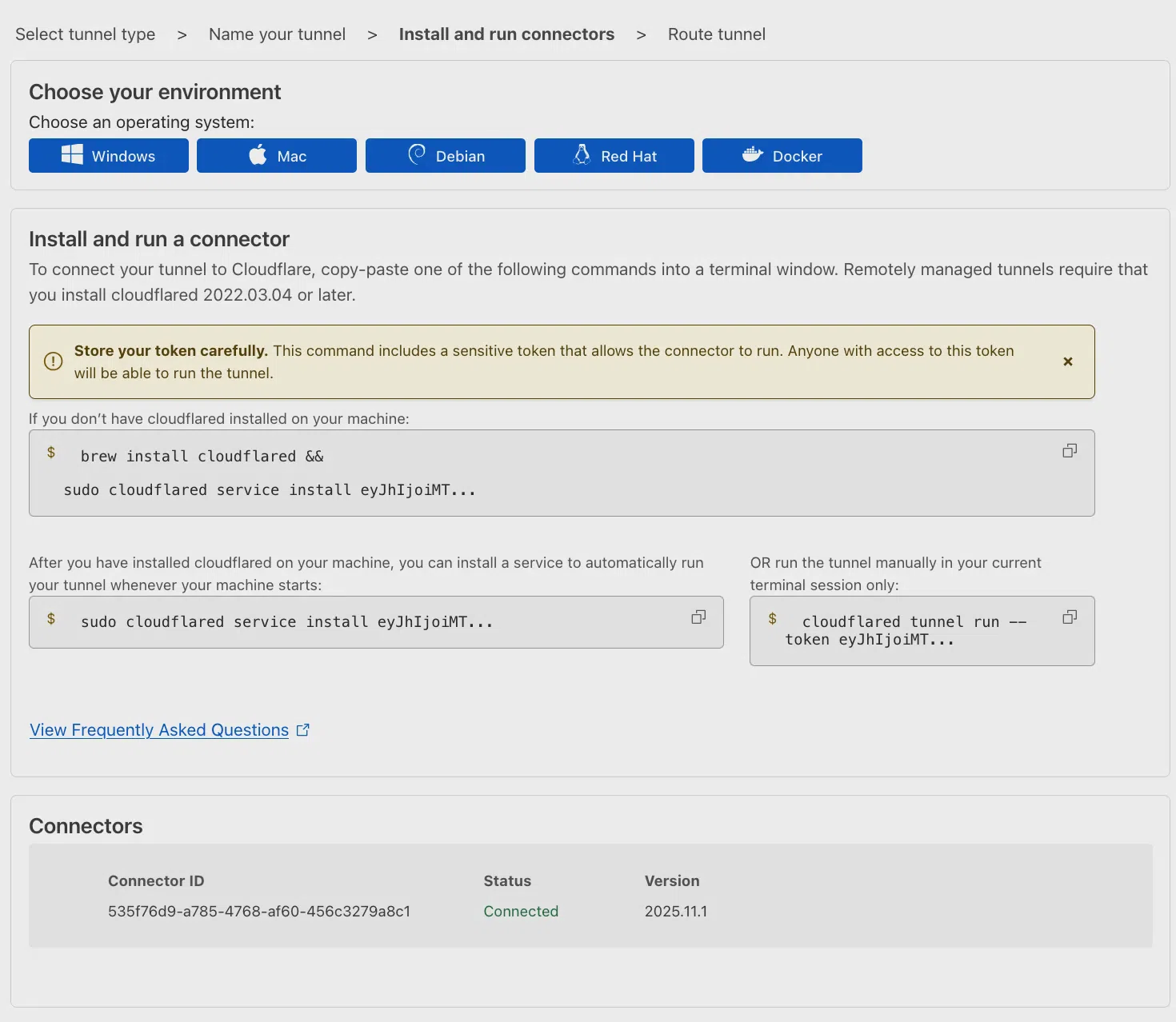 Example screenshot from Cloudflare’s Tunnel documentation showing a connector after
 cloudflared registers with Zero Trust.
A tunnel is not a traditional VPN. It is an outbound connector from your network to Cloudflare. That is why you usually do not need inbound port forwards on your router.
Step 2: Publish one hostname per service
Open the tunnel, go to the Published applications or Published application routes area, and add your services.
For each hostname, configure:
| Setting | Example |
|---|---|
| Subdomain | sonarr, radarr, tautulli, tdarr |
| Domain | your Cloudflare domain |
| Service type | usually HTTP |
| Service URL | 192.168.1.20:8989, sonarr:8989, or the URL from the connector’s point of view |
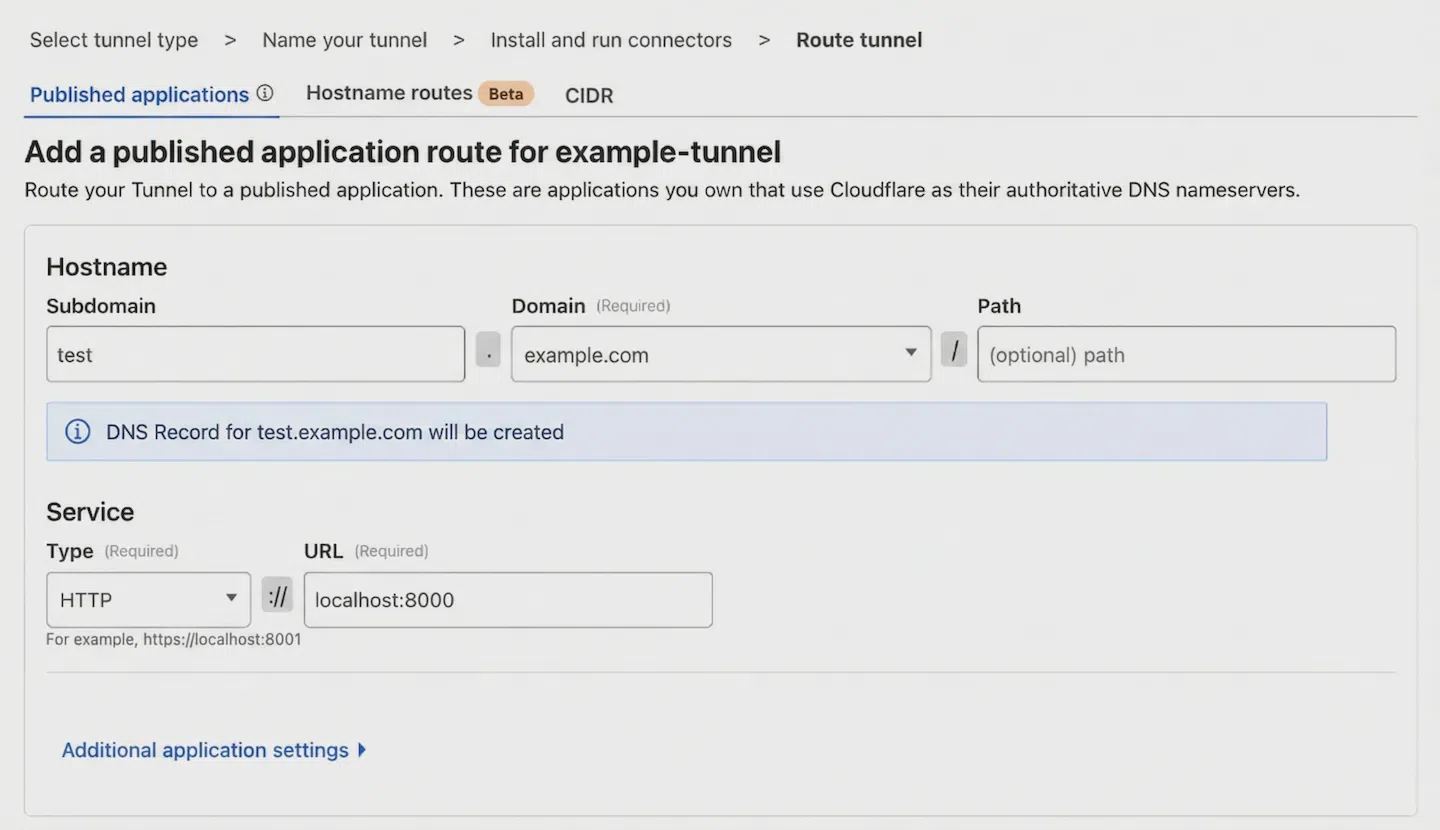 Example screenshot from Cloudflare’s Tunnel documentation showing a public hostname mapped to an internal service.
Use HTTP if the local app is plain HTTP. Cloudflare will still serve the public hostname over HTTPS at the edge.
Use HTTPS only when the local origin itself requires HTTPS. If that origin uses a self-signed certificate, you may need No TLS Verify under the tunnel’s additional application settings. That weakens origin certificate verification, so use it only when the service cannot reasonably run HTTP on the private side or present a trusted certificate.
Warning
Do not stop here. A published tunnel route without an Access application is reachable by anyone who knows or discovers the hostname. Create the Access application before you treat the service as ready.
Step 3: Add a Cloudflare Access application
Go to Zero Trust -> Access controls -> Applications and create a new application.
Choose Self-hosted and private, then add the public hostname you created for the service. You can create one Access application per service, or group several hostnames under one application. For a homelab media stack, one app per service gives cleaner logs and easier token scoping.
For normal browser access, add an Allow policy. A simple personal setup might look like this:
| Policy setting | Example |
|---|---|
| Action | Allow |
| Include | Emails -> [email protected] |
| Require | Optional country, IP range, WARP, or device posture rule |
| Session duration | 24h, 7d, or your preference |
Cloudflare Access applications are deny-by-default. A user must match an Allow policy before they get through.
For extra origin protection, edit the tunnel route and enable Protect with Access in the origin settings. This makes cloudflared validate the Access JWT before proxying the request to your origin. It is a useful second check if a hostname or route is misconfigured later.
Step 4: Create a service token for Helmarr
Now create the machine credential Helmarr will use.
Go to Zero Trust -> Access controls -> Service credentials -> Service Tokens, then select Create Service Token.
A good naming pattern is:
Helmarr iPhoneHelmarr iPadHelmarr MacBookHelmarr Shared Family iPad
One token per device is easier to revoke later than one shared token for everything.
Cloudflare will show a Client ID and Client Secret. Copy both immediately.
Caution
Cloudflare only shows the Client Secret once. Store it in a password manager. If you lose it, create a new service token and delete the old one.
The two headers Helmarr needs are:
CF-Access-Client-Id: <CLIENT_ID>
CF-Access-Client-Secret: <CLIENT_SECRET>
If you rotate the token later, update both values in Helmarr for every service that uses that Cloudflare Access application.
Step 5: Allow the service token in the Access policy
Creating a token is not enough. You also need to let that token through the Access application.
Open the Access application for the service and add a policy with:
| Policy setting | Value |
|---|---|
| Action | Service Auth |
| Include | Service Token -> your Helmarr iPhone token |
| Scope | Only the app or hostnames Helmarr should reach |
Keep your browser Allow policy as a separate policy. The final model is:
- Humans match the Allow policy and see the Cloudflare Access login flow.
- Helmarr matches the Service Auth policy and sends headers instead of using an interactive login.
Avoid using Bypass for Helmarr. Bypass turns off Access enforcement for matching traffic. Service Auth keeps the Access gate and logs in place while still supporting API clients.
For API-heavy apps, enable 401 Response for Service Auth policies in the Access application’s additional settings. When headers are missing or wrong, Helmarr gets a proper 401 instead of an HTML login page.
Step 6: Add the protected service in Helmarr
In Helmarr, add or edit the service as usual.
For Sonarr, for example:
| Helmarr field | Value |
|---|---|
| Service type | Sonarr |
| URL | https://sonarr.example.com |
| API key | Your Sonarr API key |
| Custom header 1 | CF-Access-Client-Id = your Client ID |
| Custom header 2 | CF-Access-Client-Secret = your Client Secret |
Repeat the same idea for Radarr, Lidarr, Tautulli, qBittorrent, SABnzbd, NZBGet, Prowlarr, Bazarr, Overseerr, Jellyseerr, Seerr, Tdarr, Unraid, and any other service you expose this way.
Helmarr custom headers can be added in two places:
| Where you add the headers | When to use it |
|---|---|
| Service settings | Use this when only one service needs the headers, or when each service has a different token. |
| Network settings | Use this when every service in that Helmarr network should send the same headers. Headers set on the network are inherited by all services using that network. |
For a Cloudflare Access setup where every remote hostname accepts the same service token, add CF-Access-Client-Id and CF-Access-Client-Secret once on the remote network. Then each service only needs its URL and its own app API key.
If one service uses a different Access policy or token, set that service’s custom headers directly instead.
Browser login vs Helmarr API access
Cloudflare Access can support both humans and API clients on the same hostname if you keep the policies separate.
| Client | Access policy action | Credential sent to Cloudflare | Credential sent to the app |
|---|---|---|---|
| Browser | Allow |
Identity provider session | App login or API session |
| Helmarr | Service Auth |
Access service-token headers | Sonarr/Radarr/etc. API key |
The important part is that Helmarr should match a Service Auth policy, not a Bypass policy. That keeps Cloudflare Access in the request path and gives you revocation and logs without forcing an interactive browser flow into a native API client.
Security checklist
Before you call the setup finished, check these items:
- Remove old router port forwards for the services now behind Cloudflare Tunnel.
- Keep a separate Cloudflare service token per device or per trusted user.
- Add each service token only to the Access applications it actually needs.
- Rotate service tokens when a device is sold, lost, shared, or replaced.
- Keep service API keys separate from Cloudflare credentials.
- Prefer Service Auth over Bypass for native apps and API clients.
- Enable Protect with Access on tunnel routes where possible.
- Use Cloudflare Access logs to confirm Helmarr is matching the expected Service Auth policy.
- Keep
cloudflaredupdated and run at least one reliable connector.
Troubleshooting
Helmarr shows a Cloudflare login page or HTML response
The Access app probably does not have a matching Service Auth policy, or Helmarr is not sending the headers on that service. Check the header names exactly:
CF-Access-Client-Id
CF-Access-Client-Secret
Also confirm the token you selected in the policy is the same token copied into Helmarr.
You get 403 or access denied
The request reached Cloudflare Access, but no policy allowed it. Check the Access application policy order and confirm the Service Auth policy includes the correct service token.
You get 401
This is often a good sign if you enabled 401 responses for Service Auth policies. It means Cloudflare is rejecting missing or invalid machine credentials instead of sending a browser login page. Re-copy the Client ID and Client Secret, and check for extra spaces.
Browser access works, Helmarr does not
Browser access uses the Allow policy. Helmarr uses Service Auth. Test with curl from any machine:
curl -I \
  -H "CF-Access-Client-Id: <CLIENT_ID>" \
  -H "CF-Access-Client-Secret: <CLIENT_SECRET>" \
  https://sonarr.example.com
If curl works but Helmarr does not, check the service URL, custom headers, and the app’s own API key in Helmarr.
Tunnel is healthy, but the service does not load
Check the origin URL from the cloudflared machine’s perspective. If cloudflared runs in Docker, localhost:8989 means the cloudflared container, not necessarily your Sonarr container. Use a Docker network hostname, the host gateway, or the LAN IP.
If the origin is HTTPS with a self-signed certificate, either use HTTP on the private side or configure the tunnel TLS settings intentionally.
FAQ
Do I still need a reverse proxy like Nginx Proxy Manager or Traefik?
Not for the basic setup. Cloudflare Tunnel can route each public hostname directly to a local origin. You can still keep a reverse proxy if you already use one for local routing, central headers, or certificates.
Can one Cloudflare Access application protect all services?
Yes, especially with a wildcard like *.example.com. Per-service applications are often cleaner because logs, policies, and service-token scope are easier to reason about.
Can a Cloudflare service token replace my Sonarr or Radarr API key?
No. The Cloudflare token gets Helmarr through Cloudflare Access. The app’s own API key tells Sonarr, Radarr, or the other service that Helmarr is allowed to manage it.
Do I need Cloudflare WARP?
Not for this public-hostname pattern. WARP is useful for private network access and device posture rules, but Helmarr can reach HTTPS hostnames protected by Access service tokens without WARP.
Is this safer than opening ports?
Usually, yes. You avoid direct inbound router exposure, put Cloudflare Access in front of the app, and keep a revocable service token for Helmarr. You still need to patch services, protect API keys, and avoid overly broad Access policies.
Next steps
Once remote access is working, add your core media services into Helmarr and keep the hostnames consistent. For example, sonarr.example.com, radarr.example.com, tdarr.example.com, and tautulli.example.com are easier to maintain than random paths or ports.
After Sonarr is connected, you can also tighten your media automation setup with this related guide: Sonarr Quality Profiles & Custom Formats: A Practical Setup Guide.
If you use Pangolin instead of Cloudflare, the same Helmarr idea applies with different gateway headers: How to Use Pangolin Access Tokens with Helmarr.